> ## Documentation Index
> Fetch the complete documentation index at: https://docs.livehub.gg/llms.txt
> Use this file to discover all available pages before exploring further.
# App
> Add LiveHub to your desktop as a standalone app
LiveHub can be installed as a standalone app (a PWA) on your desktop. The
installed app runs in its own window without browser chrome and opens
straight to your [launcher](/games/hosting), so it's handy for hosting games.
It's the same LiveHub — just quicker to reach and running in its own window.
## Install it
The install option shows up as soon as the page loads — where it lives
depends on your browser.
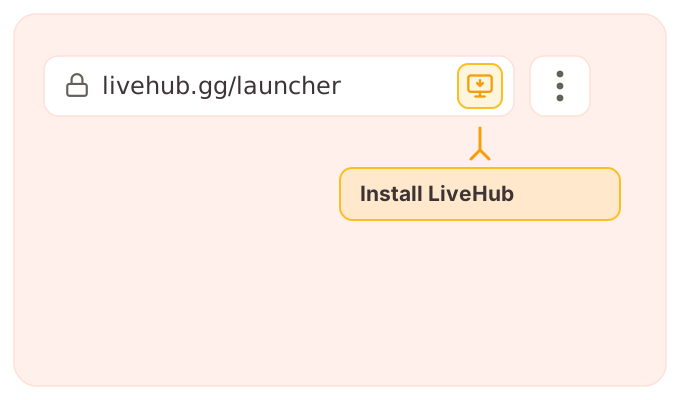
Open [livehub.gg](https://livehub.gg), then either:
* Click the **install icon** in the address bar, or
* Open the browser menu (**⋮**) and choose **Install LiveHub** (or
**Install app**).
 Open [livehub.gg](https://livehub.gg), then either:
* Click the **install icon** in the address bar, or
* Open the menu (**…**) and choose **Apps → Install this site as an app**.
Open [livehub.gg](https://livehub.gg), then either:
* Click the **install icon** in the address bar, or
* Open the menu (**…**) and choose **Apps → Install this site as an app**.

 Open [livehub.gg](https://livehub.gg), then open the Brave menu (**≡**)
and choose **Save and share → Install LiveHub…**.
Open [livehub.gg](https://livehub.gg), then open the Brave menu (**≡**)
and choose **Save and share → Install LiveHub…**.

 Open [livehub.gg](https://livehub.gg), then choose **File → Add to Dock**.

 Firefox on desktop doesn't support installing web apps. Use Chrome, Edge,
Brave, or Safari — or pin [livehub.gg](https://livehub.gg) as a bookmark or
pinned tab in Firefox instead.
## After installing
* LiveHub opens in its own window, without the address bar or browser tabs.
* Launching it from your dock or taskbar takes you to the launcher every time.
* To remove it, uninstall it like any other app (or from your browser's
installed-apps list).
Firefox on desktop doesn't support installing web apps. Use Chrome, Edge,
Brave, or Safari — or pin [livehub.gg](https://livehub.gg) as a bookmark or
pinned tab in Firefox instead.
## After installing
* LiveHub opens in its own window, without the address bar or browser tabs.
* Launching it from your dock or taskbar takes you to the launcher every time.
* To remove it, uninstall it like any other app (or from your browser's
installed-apps list).